Props
Attributes on an element — set/unset commands, literals vs {{…}} expressions, event bindings, and why most HTML/React props are not settable.
A prop is one named attribute on an element — children, variant, open, onClick. You fill it with a literal, a {{…}} expression, or (on a function slot) a function call. You never send the whole props object.
Which keys exist is not “whatever React or HTML accepts.” A slot is settable only if that kind declares it. Primitive declarations are per kind. User-component declarations are that component’s fields. An extra key is Unrecognized key.
See Registry for kinds. This page is how you set values.
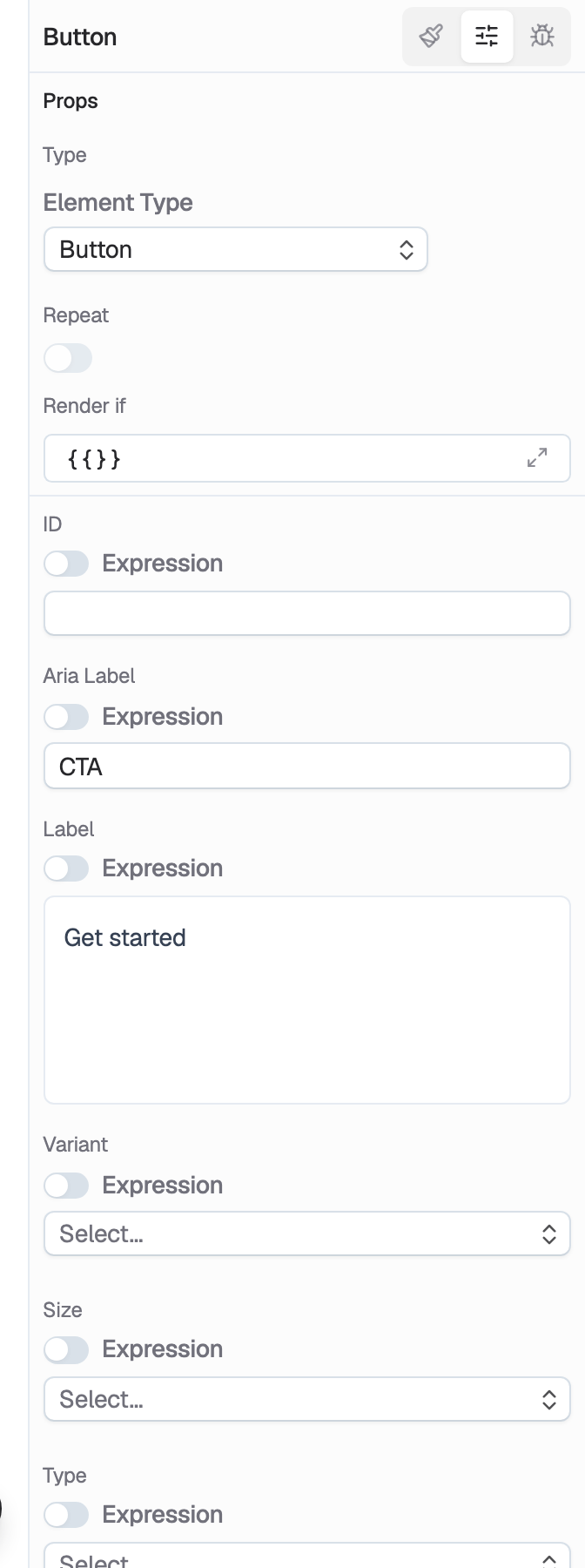
What is on a slot
Every kind also accepts global fields:
| Name | Type | Description |
|---|---|---|
id | string | DOM id. |
aria-label | string | Accessible name. A real DOM attribute, not an editor tag. |
className | string | Classes. Use this, never class. |
style | object or {{…}} | Opaque CSS object. Day-to-day styling is still the style_* tools. |
role | string | ARIA role. |
key | string | React key. |
aria-* | string / boolean / number | aria-hidden, aria-expanded, aria-pressed, aria-current, aria-controls, aria-labelledby, aria-describedby, aria-live, aria-invalid, aria-valuenow / min / max. |
data-* keys (data-state, data-favorite, …) are allowed by shape on every kind — they are not listed per kind.
A slot’s type (text, boolean, function, …) is a field type. The validator checks the stored value (literal or expression string). The renderer evaluates a whole {{…}} to its native type at render.
Set/unset, never replace
update_props takes a command list. Last write wins for duplicate keys in one call.
| Field | Type | Description |
|---|---|---|
elementId | string | The node. |
commands | list | Each command is op + key + optional value. |
op | key | value | Effect |
|---|---|---|---|
set | prop name | new value | Merge into the existing record. |
unset | prop name | — | Remove the key so the vendor default / omitted prop applies. |
Do not send every current prop. A full-object replace would force every value on every call — keys get dropped, strings get rewritten. Send only the slots you are changing.
update_element uses the same command shape for node fields (kind, repeatable, repeatSource, renderIf) — not for props. children, href, src, placeholder, instance fields, expressions, and function bindings are update_props.
Create vs update
add_element.props is an array of { key, value } where value is only string, number, or boolean.
| Key | Example value |
|---|---|
children | Save |
variant | outline |
className | w-full |
A whole {{…}} binding is a string, so it can ride a text/boolean slot on create. Objects cannot — function event bindings, nested records, arrays. Set those with update_props after the element exists. add_elements is the same primitive-value rule; Component kinds may also pass instanceProps as { key, value } entries, folded into the same record.
Read current values with inspect_element. It returns stored props (nulls stripped), not the kind’s schema.
Expressions in string slots
Anywhere a slot stores a string (or a boolean/number that also accepts a string), a whole {{…}} is an expression evaluated at render.
| Prop | Example value |
|---|---|
value | {{hooks.rsvpForm.values.email}} |
open | {{stores.rsvp.modalOpen}} |
A whole binding ("{{stores.rsvp.modalOpen}}") is stored as an expression. Mixed text ("Hello {{stores.user.name}}") stays a string and interpolates — it is not upgraded to an expression object.
| Expression | Meaning |
|---|---|
{{stores.<name>.<field>}} | Live store state. |
{{hooks.<alias>.<key>}} | Hook output (values, errors, data, …). |
{{props.<key>}} | Enclosing component instance. |
{{event}} | First argument to the handler. On onValueChange / onOpenChange / onCheckedChange, that argument is the new value. |
{{event.target.value}} | Native onChange on an input. |
{{repeat.item}} / {{repeat.index}} | Inside a repeated subtree. |
{{session.*}} / {{page.*}} | Ambient viewer / route. |
Function, component, and element slots do not accept a bare {{…}} — they store a binding record. Boolean/text/object/array slots do.
Declare every store field you bind, with a defaultValue. An undeclared field is undefined on first paint and flips controlled inputs.
Action bindings on event props
An event slot (onClick, onChange, onValueChange, onOpenChange, onSubmit, …) is a function type. The stored value is a call:
| Name | Type | Description |
|---|---|---|
functionId | string | Primitive slug (list_primitive_functions), a store action id, or "<hookId>.<method>" from list_hooks. |
instanceParams | object | Arguments. Values may themselves be {{…}}. |
Full catalog: Action. One call per element slot — sequences live on a store action, pointed at from N slots.
This is an object, so it goes through update_props, not add_element.props.
For Dialog / Switch / Select, round-trip with "{{event}}" on onOpenChange / onValueChange / onCheckedChange.
Pointer events (onClick, onMouseEnter, onMouseLeave) are not global. They are declared only on kinds whose wrapper forwards them to the node the user actually clicks. A handler on a wrapper that never fires is worse than missing.
Why most HTML / React props are not settable
The vendor component still accepts native attributes. The builder does not persist them unless they are fields.
- Strict schema. Extra keys fail. MCP, the prop editor, and insert all go through that schema.
- Opt-in DOM surface. Coss wrappers inherit hundreds of HTML attributes. Declaring all of them on every kind would drown the props form. Input-ish kinds share a text-entry bundle, and clickable kinds share pointer events — still an explicit list, not a global.
- Names must be real vendor props — the reverse is false. A declared name exists on the component. Not every vendor prop is declared.
- Some vendor props are deferred. Out-refs such as
actionsRefandinputRefhave no authorable value yet. - HTML
divis not a grab-bag. Adivhaschildrenplus globals.onClick,tabIndex,title,hiddenare not slots. Put a click on aButton(or ana), not adiv. - Native form attributes that fight the hook flow are omitted. coss
Formdeclareserrors,onSubmit,validationMode— not HTMLaction/method. Those would trigger a full-page POST.
If update_props rejects a key, that prop is not declared for the kind. Do not try to smuggle it through className or a data-* except where a data attribute is actually what you mean.
Examples
Component instances
On a Component-kind node, slots are that component’s fields plus globals. list_components then load_component_outline for the schema. Set instance values with update_props (or instanceProps on add_elements).
Inside the definition, bind_prop writes {{props.<key>}} onto an inner element’s slot:
| Argument | Example |
|---|---|
elementId | the heading |
propKey | title |
targetProp | children |
You can set the same expression yourself with update_props. bind_prop is the dedicated form. set_props_schema replaces the whole fields array — not incremental.
MCP tools
| Tool | What you use it for |
|---|---|
list_element_types / inspect_element_type | Know the kind before you set slots. |
inspect_element | Current stored props. |
add_element / add_elements | Literals only (string | number | boolean). |
update_props | Set/unset slots, expressions, function calls. |
list_primitive_functions | Primitive functionId + param names. |
list_stores / list_hooks | Names and ids expressions and bindings point at. |
list_components / load_component_outline | Instance field schema. |
bind_prop / set_props_schema | Component definition wiring. |
Gotchas
- Commands, not a blob. Merge is server-side. Re-sending the whole props object is how keys vanish.
- Unrecognized key. The kind does not declare it. Check Registry, not the React types.
onClickis not universal. Button yes; Input no;divno.functionId, not a JS body. The element stores a pointer. Bodies live on storecode-actions.{{event}}vs{{event.target.value}}. Base UI change/open/checked handlers pass the value as the first argument. NativeonChangestill uses the DOM event.classis invalid.classNameonly.aria-labelis a DOM name, not an editor tag. Set it when the node has no accessible name of its own (icon-only button). Visible text already names the control — a second label overrides it in the accessibility tree.